ProjectOS is the all-in-one platform for builders — estimating, takeoff, drawings, RFIs, change orders, scheduling, invoicing you get paid on, accounting, site sign-in and safety, in one login. It handles the paperwork so your crew can stay on the tools. One fair price. Every worker free.
No signup needed to look around · 30-day free trial · Every worker gets a free ProjectID · Sign in
projectos.ca · Site Attendance
Live site sign-in — who's on site, by company, in real time.
Tour the tools
The whole build, in one place
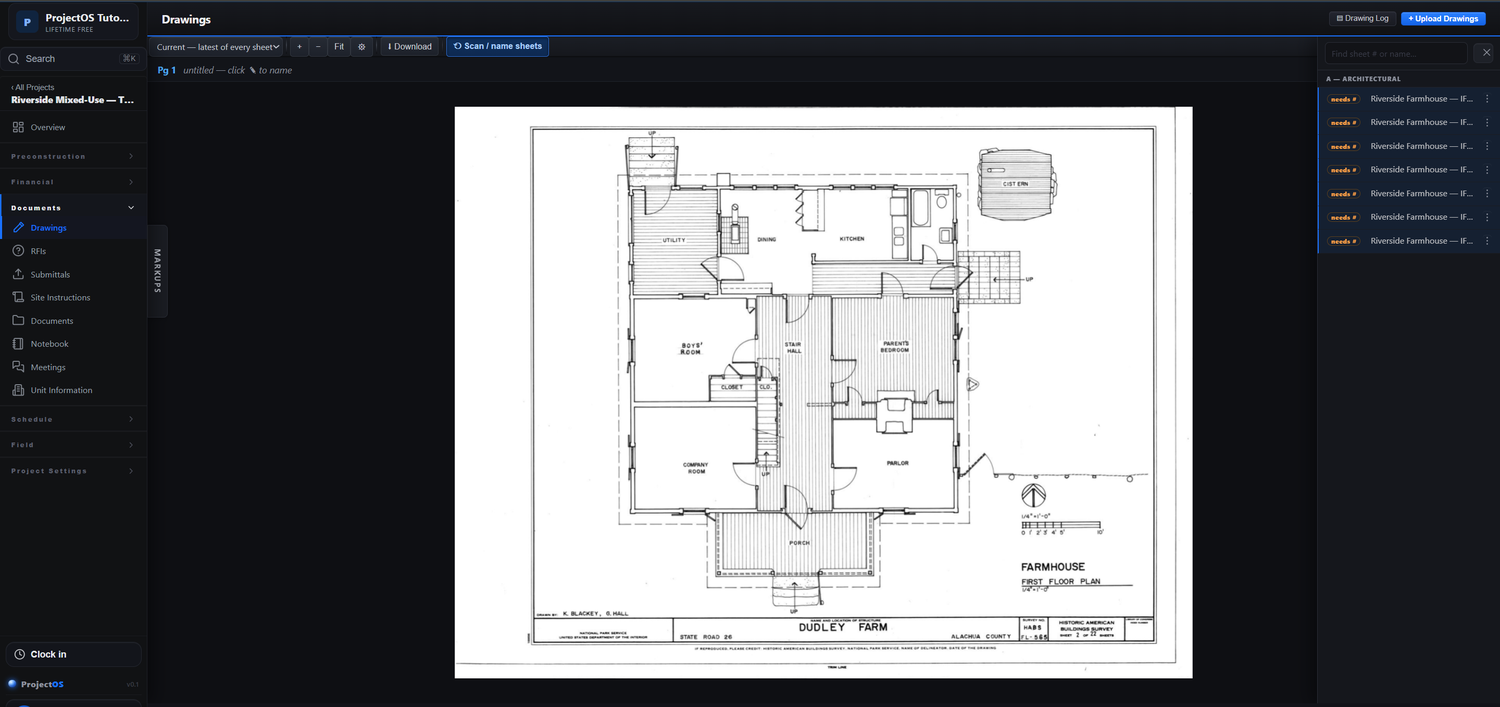
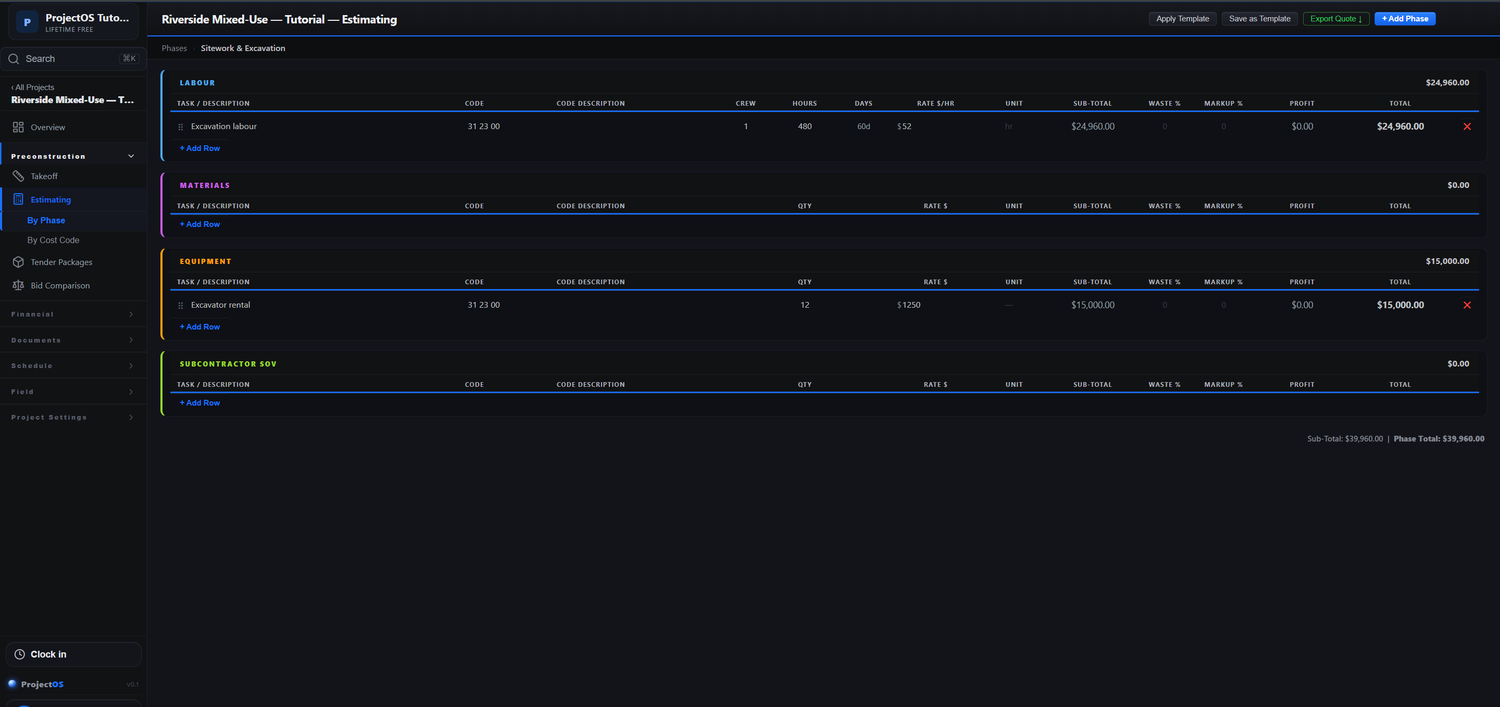
Real screens from ProjectOS — the estimate, the drawings and the worker's ProjectID all run in the same login, right beside the live site board above.
projectos.ca · Drawings
Drawings & takeoff — measure on the PDF; quantities flow into the estimate.
projectos.ca · Estimating
Estimating & budgets — labour, material and equipment, by phase or cost code.
Free for every worker
ProjectID — one portable pass for every worker
Each worker gets a free ProjectID: their sign-in QR, tickets and certifications, employers and site hours — on their phone, carried from job to job and company to company. The field app is free for them, forever.
✓ Sign in to any ProjectOS site with a phone + PIN — no app-store download
Replaces the stack you're paying for and patching together
Estimating spreadsheetsSeparate takeoff softwareDrawings in emailPaper sign-in sheetsThe safety binderProgress-claim spreadsheetsA second accounting app$$$ enterprise software
The daily reality
Your project lives in ten different places
The estimate's in a spreadsheet. The drawings are in someone's email. Sign-in is a clipboard at the gate. Billing is another spreadsheet, and the books are in a different app. Pulling it together costs you hours — and the gaps cost you money.
Takeoff and the estimate don't talk
You measure quantities on the drawing, then key them into the estimate by hand — twice the work, twice the chance of an error.
The field runs on paper
Sign-in sheets, FLHAs and orientation sign-offs pile up in a binder no one can search when an inspector — or an incident — asks who was on site.
Getting paid is a monthly grind
Progress claims, holdback and GST get rebuilt in a spreadsheet every month, and you chase what's still owed by memory.
Big software is overkill; small apps fall short
The enterprise platforms cost a fortune and need a specialist; the small-business apps can't handle real estimating, drawings or site safety.
Where ProjectOS fits
Priced out of the big platforms. Outgrew the basic apps.
If you've been priced out of the enterprise construction platforms, or you've outgrown the basic small-business apps — this is the middle that was missing.
Enterprise platforms
Powerful, but enterprise-priced
Priced as a percentage of your construction volume, sold through a quote and a sales cycle, and packed with modules you'll pay for but never use. Great for a top-100 GC. Overkill for the rest of us.
ProjectOS
The full toolset, at a builder's price
Everything from the estimate to the field to the invoice — including the things small apps skip (takeoff, drawings, site safety, progress billing). Flat monthly price, no per-seat math, workers always free, no sales call to start.
Small-business apps
Simple, but you've outgrown it
Fine for a handyman's quotes and invoices, but no real estimating or takeoff, no drawing control, no geofenced site sign-in, no FLHA/orientation compliance, no subcontractor management.
Why teams switch
One platform, from the office to the gate
ProjectOS connects the parts of a job that usually live apart — and it's strongest exactly where the office tools are weakest: the field, safety, and getting paid.
⊿
Take off once, estimate instantly
Measure counts, lengths and areas on the drawing and push them straight into the estimate as line items — no re-keying between apps.
✓ Takeoff quantities flow into estimate line items automatically
$
Bill it and get paid
Progress claims build from your budget by percent complete, with holdback and GST handled — invoice out, record EFT/cheque/card payments, and see exactly what's still owed.
✓ Progress billing, holdback & GST, invoices and A/R built in
🦺
Safety, documented automatically
Geofenced sign-in, orientations with sign-off, daily FLHAs on a phone, and a generated WorkSafeBC-aligned site safety plan — every record dated and searchable.
✓ Sign-in, orientation & FLHA records + a site-specific safety plan
⚑
Know exactly who's on site
GPS-stamped sign-in from a kiosk or the worker's phone, a live headcount, and a one-tap evacuation roster with the emergency info first aid actually needs.
✓ Live headcount + evacuation roster with emergency info
What's inside — nothing hidden
Everything a build needs, end to end
One login from the first estimate to the final invoice. Here's the whole thing, in plain terms.
Win the work · preconstruction
∑
Estimating & budgets
Build estimates by phase or cost code with labour, material and equipment separated out. The primary estimate becomes your budget, so you track budget vs. actual and forecast the final cost as the job runs.
⊿
Drawings & takeoff
Upload a PDF set and measure counts, lengths and areas right in the browser. Set the scale once; quantities flow into your estimate. ProjectOS even reads sheet numbers from the title block so your set labels itself.
⊡
Tenders & bid leveling
Invite subtrades to bid a package, collect their numbers, and compare them apples-to-apples with scope gaps and exclusions side by side — so you award with eyes open, not on price alone.
Run the work & get paid · project controls
◈
RFIs, SIs & the register
Track RFIs, site instructions and more in one register, with the RFI → site instruction → change order chain linked so nothing falls through the cracks.
Δ
Change orders
Raise changes as their own estimate, carry them into the budget, and bill them in full with no holdback — exactly how change orders are supposed to flow.
📅
Schedule & 3-week look-ahead
A project schedule with a rolling three-week look-ahead so the field always knows what's coming next.
$
Progress billing & get paid online
Progress claims auto-build from your budget by percent complete, carry last month's billings forward, apply holdback and GST, and print a clean invoice. Email a secure pay-link and your client pays by card — the payment records itself and marks the invoice paid. Track EFT, cheque and card together, with receivables at a glance.
▤
Accounting
A built-in ledger so your job costs and billing don't have to live in a separate accounting app. (Card and bank payments via Stripe — your numbers never leave the platform.)
☰
Daily logs, photos & reports
Daily logs with weather, crew, deliveries and equipment, a photo log, a project calendar, and a report maker that pulls the day together for the owner.
The field & safety · where ProjectOS wins
⚑
Site sign-in kiosk
GPS-stamped sign-in from a jobsite kiosk or the worker's phone, with a live headcount and an instant evacuation roster carrying the emergency and medical info first aid needs.
🎓
Orientations
Site-specific orientations with read-along, a quiz and sign-off — run them solo or for a whole crew at once, with a compliance record for every worker.
🦺
FLHA, forms & safety plan
Daily field-level hazard assessments and your own custom forms, filled on a phone on site. Plus a generated, WorkSafeBC-aligned site-specific safety plan that pulls in the right sections for your project's hazards.
👷
Crews & workforce
Build crews, assign a lead, and let the lead sign their whole crew in from the field app. Manage tickets, certifications and expiry reminders.
The network · GC ⇄ subcontractor
◉
ProjectID — free for every worker
Each worker gets a free, portable profile that carries their tickets, certs and employers from job to job and company to company. The field app is free for them, forever.
🔁
Linked projects
When a GC and a sub both use ProjectOS, their projects link: the GC publishes the current drawings down, and the sub's RFIs flow up for the GC's approval before going to the consultant. Invited subs bid for free.
Up and running fast
From sign-up to your first sign-in
Create your company
Start a free 30-day trial, add your first project, and invite your office team — no card required to begin.
Upload drawings & build the estimate
Drop in your PDF set, take off quantities, and stand up the estimate and budget for the job.
Open the gate
Workers sign in with a free ProjectID, run their orientation and FLHA, and you've got live headcount and compliance from day one.
Why not a spreadsheet or a generic PM tool
Made for the way builders actually work
✓
Truly all-in-oneEstimating, takeoff, drawings, RFIs, change orders, scheduling, progress billing, accounting, site safety and reporting — one login, not eight subscriptions.
✓
Field-first, not bolted onGeofenced sign-in, FLHAs, orientations and crew check-in are core — not an afterthought to an office tool.
✓
It does the paperworkSafety records, progress claims, holdback and GST, daily logs and reports are generated as you work — so your crew stays on the tools.
✓
A free ProjectID every worker keepsOne portable profile — tickets, certs, employers — that follows the worker from job to job and company to company.
✓
Priced for contractors, not enterprisesOne flat monthly price with unlimited projects and office users, and workers always free — no per-seat math, no volume-based fees, no sales call.
✓
Your data is scoped and protectedEach company sees only its own projects and people, and sensitive medical info is encrypted at rest.
Why we built it
From a superintendent who got tired of the paperwork
“I ran jobs where the estimate, the drawings, the sign-in sheet and the billing all lived in different places — and I spent my evenings stitching them together instead of building. The big platforms wanted a fortune and a sales call; the cheap apps couldn't handle a real job. So I built the tool I wanted on site: everything in one place, the paperwork handled for you, and free for every worker who shows up.”
— The team behind ProjectOSBuilt in the open
We ship improvements every week
ProjectOS gets better constantly — here's what we've been building and fixing lately. If you're already using it, this is us, still at it.
Early September 2026
NewGet paid online — email a secure pay-link on any invoice; your client pays by card and the payment reconciles itself and marks the invoice paid. Powered by Stripe, straight to your bank.
NewCrew Schedule — a company-wide dispatch board: drag workers and crews onto jobs by day, see planned-vs-actual against real site sign-ins, and publish the week to everyone's phone.
NewEquipment & Tools — a company asset register with photos, sign-out to jobs or people, service tracking, and bulk quantities for consumables like scaffold.
NewMeetings — templated agendas with live cross-module widgets and carry-forward minutes, so nothing gets dropped between meetings.
ImprovedMobile & settings — cleaner phone layouts across projects, equipment, tools and a unified, tabbed Settings area.
Week of Aug 11, 2026
NewMaster Schedule — a full MS-Project-style planner: a spreadsheet and Gantt chart side-by-side that each scroll on their own (and pop out to a second monitor), snap zoom from day to year, predecessor scheduling with dependency lines, a critical-path view, and a working calendar that flags weekends and stat holidays by region.
NewResources & Materials — a reusable trade directory (companies → people, by division) with a one-click standard trade list, plus a materials catalog that pulls from your cost library.
NewCombined estimate PDF — export a letterheaded proposal with your attached PDFs merged into one document, in the breakdown you choose.
ImprovedEstimating — per-line and overall markup, a drag-and-drop attachments widget, and Cost/Bid comparison with a lowest-price summary.
Fixed Landscape PDF orientation and auto-named exports, letterhead rendering, and a handful of Gantt alignment and scroll-position polish items.
One fair price. Workers always free.
No per-seat math, no volume-based fees, no sales call. Try the whole platform free for 30 days — then it's one flat price for your entire company.
ProjectOS — full platform
$75/ month
First 30 days free · no card to start · cancel anytime
✓ 30-day free trial, then $75/month for your whole company
✓ Unlimited office users & unlimited projects
✓ Free field app & ProjectID for every worker, always
30 days free · then $75/mo flat · workers always free · cancel anytime
Questions
Frequently asked
How is this different from the big enterprise platforms?
Same end-to-end coverage for a real build, without the enterprise price tag, the sales cycle, or the modules you'll never use. ProjectOS is one flat monthly price, workers are free, and you can start today without talking to anyone. Those platforms make sense for the largest GCs — ProjectOS is built for everyone else.
We use a small-business app — why switch?
Those are great for quotes and invoices, but they don't do real estimating or takeoff, drawing control, geofenced site sign-in, FLHA/orientation compliance, or subcontractor management. If you've outgrown "quote and invoice," ProjectOS is the next step up — without jumping all the way to enterprise software.
Does it really include billing and accounting?
Yes. Progress claims build from your budget by percent complete, handle holdback and GST, and print as invoices; you record payments (EFT, cheque or card) and track receivables. There's a built-in ledger so job costs and billing don't have to live in a separate app.
How long does it take to get started?
Minutes. Create your company, add a project, upload a drawing set, build an estimate, and open site sign-in the same day — no card required to begin the 30-day trial.
Do my workers have to pay?
No. Every worker gets a free ProjectID — their portable profile, tickets and certifications — and the field app is free for them, forever. Only the company subscribes.
Is my company's data private and secure?
Yes. Access is company-scoped — each company sees only its own projects and people — and sensitive medical and emergency information is encrypted at rest. Card payments are handled by Stripe's hosted checkout, so card numbers never touch our servers. We are not yet SOC 2 or ISO 27001 certified; we'll say so plainly rather than imply otherwise.
Is the safety content compliant?
The safety library is built around the WorkSafeBC OHS Regulation (British Columbia) and generates a site-specific plan tailored to your project's hazards. It's a strong starting template, not legal advice — every plan should be reviewed and signed off by a qualified safety professional before you rely on it, and the app prompts for exactly that.
What does it cost?
Your first 30 days are free with no card. After that it's $75/month flat for your whole company — unlimited projects and office users, workers always free, cancel anytime. No per-seat fees and no percentage-of-volume pricing.
Two ways to start
Not every ProjectID needs ProjectOS. Pick the path that fits you:
① Sign up your company
Run the whole platform for your business — estimating, drawings, billing, site sign-in and more. Free for 30 days, then $75/month flat, workers always free, cancel anytime.
✓ 30-day free trial — no credit card to start
✓ The full platform, nothing held back
✓ Free field app & ProjectID for every worker
Fill out the form → your company is created and you're the admin.
② Get a free ProjectID
Just want your own portable profile? Create a free ProjectID — your tickets, certs and employers follow you from job to job and company to company. No company subscription needed, free forever.